
2026-03-14
Journey of Scraping – Part 2
Running scraper on VPS
- Python
- Playwright
- Scraping
- English
- Journey of scraping
- VPS
This is the second part of a series dedicated to web scrapers. In this part, I’m going to talk about running the scraper on a VPS. Note: I’m still new to Python and web scraping. This series is mainly a way for me to learn. You can find the full code in this GitHub repository.
Why VPS?
The main goal was to run the scraper once a day, scrape data, and send a notification to Telegram if any new listings were added. I used a Hostinger VPS for this. I didn’t want to run it from my PC and wanted to automate everything.
Scraper problems while using VPS
IP
When you run the scraper on your own machine, it uses your network and your (residential) IP. On a VPS, it uses a (datacenter) IP instead. The biggest difference is the trust factor: websites can easily see that the traffic is coming from a server, and these IPs are often flagged and blacklisted by default. The easiest way to fix this is by using a proxy. I chose Dataimpulse because their dashboard and pricing looked most attractive. After getting the proxy, I simply extended my Chromium launch configuration with proxy parameters:
    browser = p.chromium.launch(
        ...,
        proxy={
            "server": PROXY_SERVER,
            "username": PROXY_USERNAME,
            "password": PROXY_PASSWORD
        },
    )
Headless
As mentioned in Part 1, using headless mode makes your scraper more easily detected by bot protection. But how do you run Chrome with headless=False on a VPS without a display? You use a virtual display. This is where Xvfb (X Virtual FrameBuffer) comes in. After installing Xvfb, you wrap your scraper run command with xvfb-run.
xvfb-run --server-args="-screen 0 1920x1080x24" python main.pyCron job
A cron job is a scheduling utility that runs tasks—or in this case, my Python script—at specific predefined time intervals. I wanted to run my script once a day at 5:00 p.m., so my cron job looked like this:
0 15 * * * cd /root/nt-listings-scaper && xvfb-run --server-args="-screen 0 1920x1080x24" /root/nt-listings-scaper/.venv/bin/python3 main.py >> /root/nt-listings-scaper/cron.log 2>&1A few things to consider while adding a cron job on a VPS: check both the VPS timezone and your timezone—they are most likely different. Use full paths to the virtual environment’s Python and script as the cron environment is stripped down.
Telegram Notification
To send Telegram notifications, I used the python-telegram-bot package. The setup was straightforward. In the Telegram app, I created a new bot using BotFather. I created a separate group chat in Telegram and added my bot. Using the bot token and chat_id, every time my cron job ran I sent a notification about new listings.
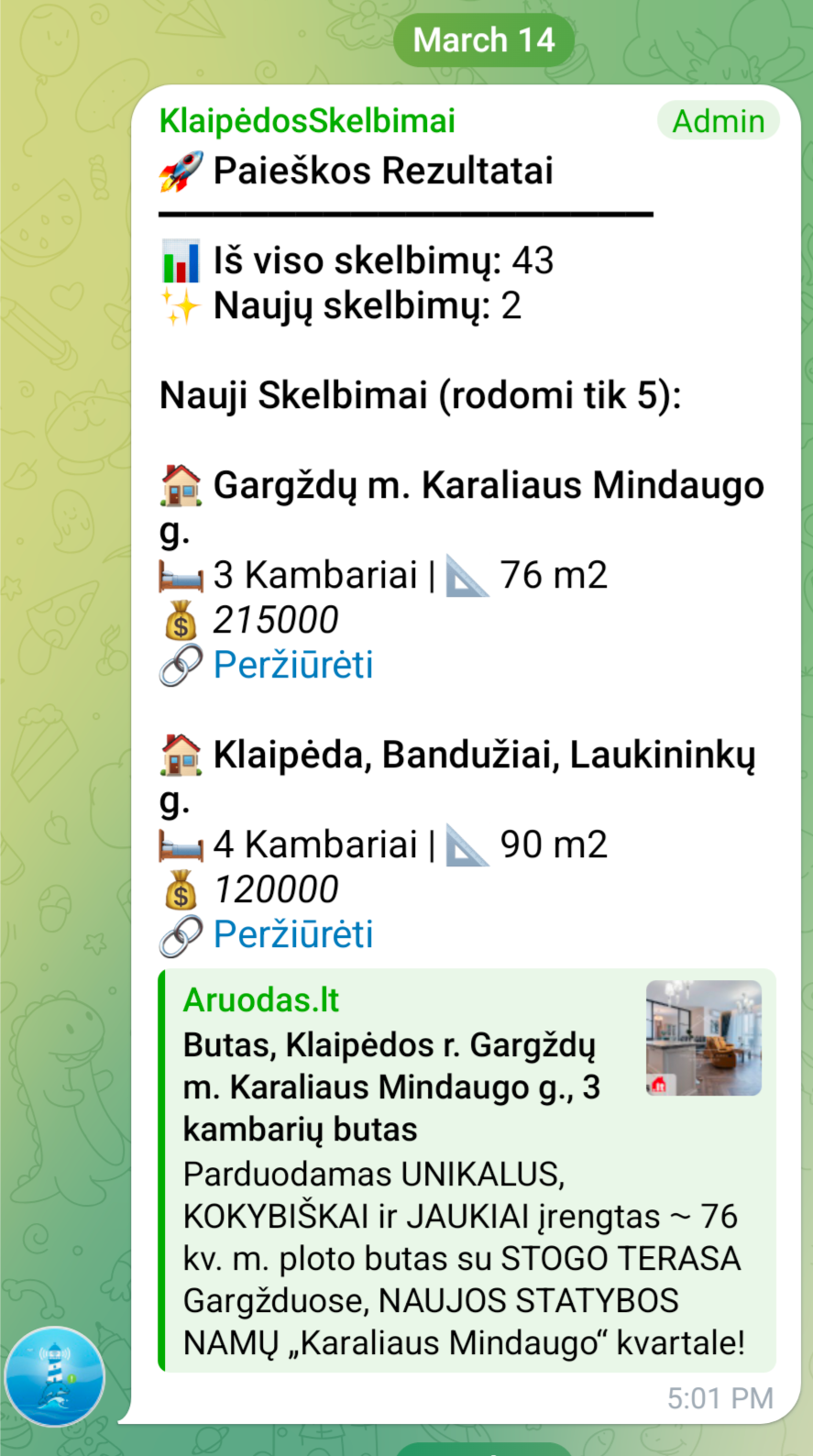
Running the scraper on a VPS with a proxy, Xvfb, a cron job, and Telegram notifications now lets me collect new real estate listings automatically every day without touching my PC. It’s not a perfect setup, but it works reliably enough for my needs and helped me learn a lot about Python, Playwright, and Linux along the way.